> ## Documentation Index
> Fetch the complete documentation index at: https://docs.drivly.dev/llms.txt
> Use this file to discover all available pages before exploring further.

# Overview

> Get pre-approved to finance a vehicle.

export const HeroContent = ({children, withGrid}) => <div>
    <div class="not-prose relative bg-gray-50/50 rounded-xl overflow-hidden dark:bg-gray-800/25">
      {withGrid && <div class="absolute grid content-center inset-0 bg-grid-neutral-200/20 [mask-image:linear-gradient(0deg,#fff,rgba(255,255,255,0.6))] dark:bg-grid-white/5 dark:[mask-image:linear-gradient(0deg,rgba(255,255,255,0.1),rgba(255,255,255,0.5))]" style={{
  backgroundPosition: '10px 10px',
  color: '#070712'
}}></div>}
      <div class="relative rounded-xl overflow-hidden flex justify-center">{children}</div>
      <div class="absolute inset-0 pointer-events-none border border-black/5 rounded-xl dark:border-white/5"></div>
    </div>
  </div>;

<HeroContent withGrid>
  <img class="block" src="https://mintcdn.com/chrisrisner/RWKuBzNyztB4Jver/images/PreapprovalShell.png?fit=max&auto=format&n=RWKuBzNyztB4Jver&q=85&s=f500e904c3be552ffbc4785d20d141a8" width="3456" height="1922" data-path="images/PreapprovalShell.png" />
</HeroContent>

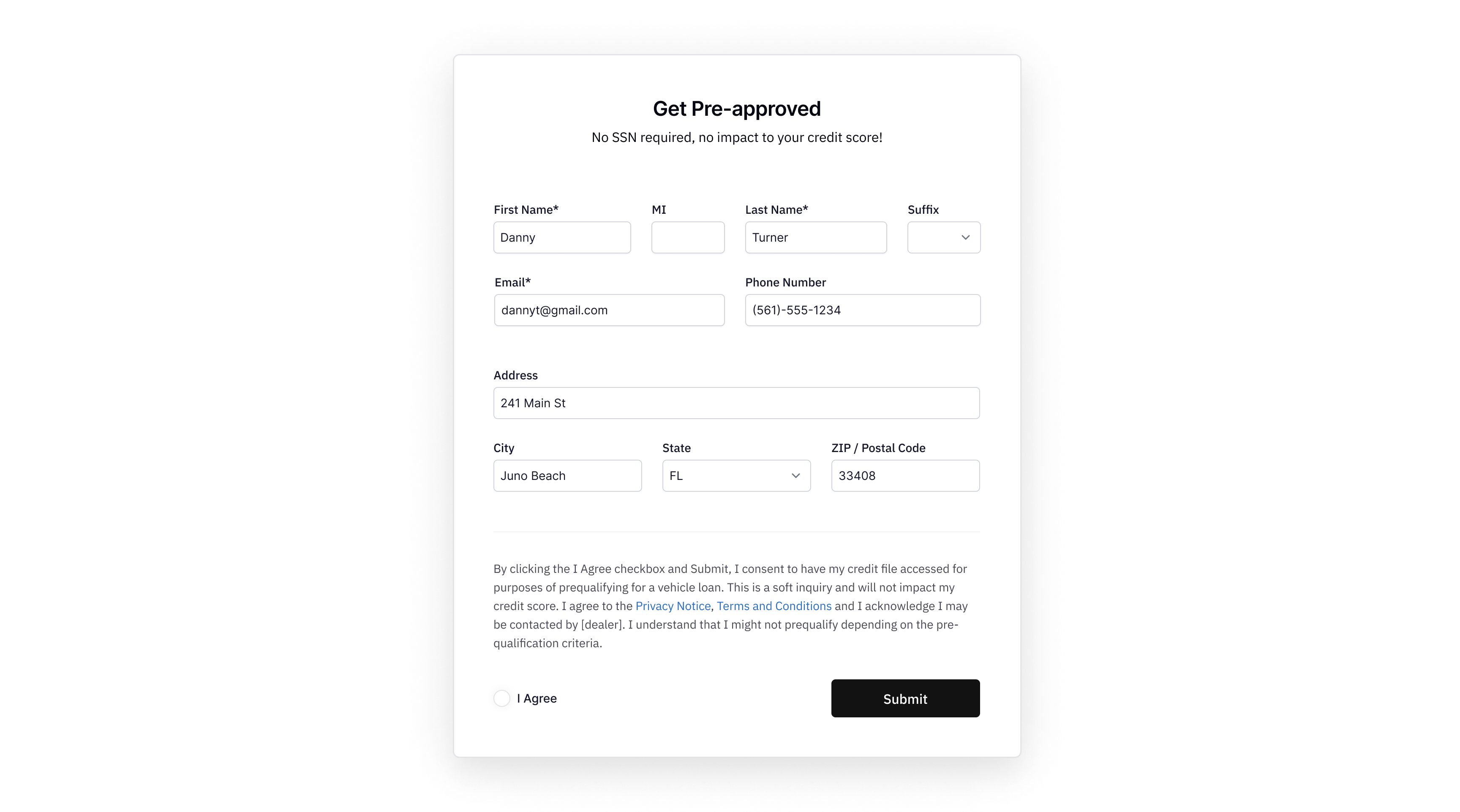
The Pre-Approval API is designed to revolutionize the vehicle financing process by enabling quick, efficient, and customer-friendly pre-approval for auto loans.

This API provides a seamless way to perform soft pulls on credit scores, offering customers and businesses a fast path to understanding financing options with no Social Securtity Number (SSN) requirements and no impact to credit scores.

***

## Benefits of Using the Pre-Approval API

Before diving into the technical details of how to use Pre-Approval, let's explore the key benefits and reasons why integrating this API can be a game-changer for your business and customers.

### Enhance Customer Experience

* **Speed and Convenience:** Enables instant pre-approval decisions, improving the customer journey.
* **Transparency:** Builds trust with upfront financing information.

### Increase Sales Efficiency

* **Qualified Leads:** Focuses efforts on financially eligible customers.
* **Customized Offers:** Tailors offers to fit customer budgets, improving conversion rates.

### Minimize Risk

* **Soft Credit Pulls:** Protects customer credit scores during the inquiry process.
* **Accurate Financial Assessment:** Ensures appropriate loan terms to minimize defaults.

### Streamline Operations

* **Automated Processing:** Reduces manual workloads and operational costs.
* **Integration with Sales Processes:** Enhances data flow across business operations.

### Competitive Advantage

* **Innovative Service:** Differentiates your business with a digital-first approach.
* **Data-Driven Decisions:** Improves product and offer alignment with customer needs.

***

## Authentication

To securely use this endpoint:

1. **Sign up** for a Drivly account
2. Create a [DRIVLY\_API\_KEY](/commerce/overview#authentication).

<Note>The key should be included in the header of each request.</Note>

```javascript theme={null}
headers: {
  'Authorization': '<api-key>',
  'Content-Type': 'application/json'
}
```

<Card title="API Best Practices" href="/commerce/overview#best-practices-for-api-key-security" icon="shield">
  Learn how to keep your API key secure and prevent unauthorized access.
</Card>

***

## Making a Pre-Approval Request

Submit a pre-approval to `https://commerce.driv.ly/api/preApprovals` with a `POST` request. Below is a breakdown of the required and optional data fields, supplemented with example requests for your applications.

### Required Fields

* `firstName`: Customer's first name (String)
* `middleInitial`: Customer's middle initial (String)
* `lastName`: Customer's last name (String)
* `address`: Customer's physical address (String)
* `city`: City of the address (String)
* `state`: State of the address (AA format) (String)
* `zip`: Zip code of the address (String)
* `phone`: Customer's phone number (String)
* `email`: Customer's email address (String)

### Optional Fields

* `income`: Customer's income (String)
* `ipAddress`: IP address of the customer making the request (String)
* `userAgent`: User agent of the customer's browser (String)
* `isp`: Internet Service Provider of the customer (String)

### Fetch API Example

<CodeGroup>
  ```javascript Async/Await theme={null}
  export async function createPreApproval() {
    try {
      const response = await fetch('https://commerce.driv.ly/api/preApprovals', {
        method: 'POST',
        headers: {
          Authorization: '<api-key>',
          'Content-Type': 'application/json',
        },
        body: JSON.stringify({
          firstName: 'Danny',
          middleInitial: '',
          lastName: 'Turner',
          suffix: null,
          address: '241 Main St',
          city: 'Juno Beach',
          state: 'FL',
          zip: '33408',
          phone: '(561) 555-1234',
          email: 'dannyt@gmail.com',
          income: '$15,000',
        }),
      })

      if (!response.ok) {
        throw new Error(`HTTP error! status: ${response.status}`)
      }

      const responseData = await response.json()
      console.log('Pre-Approval Response:', responseData)
    } catch (error) {
      console.error('Error during the API request:', error)
    }
  }
  ```

  ```javascript Promises theme={null}
  fetch('https://commerce.driv.ly/api/preApprovals', {
    method: 'POST',
    headers: {
      Authorization: '<api-key>',
      'Content-Type': 'application/json',
    },
    body: JSON.stringify({
      firstName: 'Danny',
      middleInitial: '',
      lastName: 'Turner',
      suffix: null,
      address: '241 Main St',
      city: 'Juno Beach',
      state: 'FL',
      zip: '33408',
      phone: '(561) 555-1234',
      email: 'dannyt@gmail.com',
      income: '$15,000',
    }),
  })
    .then((response) => response.json())
    .then((data) => console.log(data))
    .catch((error) => console.error('Error:', error))
  ```
</CodeGroup>

<p class="font-medium">
  This function createPreApproval sends the pre-approval data to the API endpoint using fetch with a
  POST method. It waits for the response asynchronously, converts the response to JSON, and logs it
  to the console. If an error occurs during the request or while handling the response, it catches
  the error and logs it, which is crucial for debugging and user feedback in real applications.
</p>

<Note>To execute the function, simply call createPreApproval() from your JavaScript code.</Note>

<p class="font-medium">
  This example is meant to be a basic demonstration. In production, you might want to handle errors
  more gracefully and provide user feedback based on the result of the API call.
</p>

***

## Successful Response

Upon successful submission, the API returns a response containing the following generated values:

* `id`: Unique identifier for the pre-approval (String)
* `customer`: Customer's unique identifier (String)
* `segmentationBand`: Credit score band, e.g., "Excellent (750-900)" (String)
* `lead`: Unique identifier for the lead generated (String)
* `status`: Current status of the pre-approval, e.g., "Processing" (Enum)
* `estimatedInterestRate`: Estimated interest rate for the loan (String)
* `estimatedLoanTerm`: Estimated term for the loan in months (String)
* `updatedAt`: Timestamp of the last update (String)
* `createdAt`: Timestamp when the pre-approval was created (String)

The response will contain the same values as the request, along with the generated values. The
response will also include the status of the pre-approval, which can be used to track the progress
of the request. The status will be one of the following values: `Processing`, `Error`,
`Processed`, `Needs Info`.

### Example Response

```javascript theme={null}
{
  id: '12034631b86bb45g202071a1',
  title: 'Danny Turner (dannyt@gmail.com)',
  firstName: 'Danny',
  middleInitial: '',
  lastName: 'Turner',
  suffix: null,
  address: '241 Main St',
  city: 'Juno Beach',
  state: 'FL',
  zip: '33408',
  phone: '+15615551234',
  email: 'dannyt@gmail.com',
  sessionId: '',
  createdAt: '2024-03-26T22:03:29.685Z',
  updatedAt: '2024-03-26T22:04:01.175Z',
  status: 'Processed',
  income: '$15,000',
  AppId: 154422063,
  customer: '12ab3d1241567b12d2ga12c1',
  segmentationBand: 'Good (700-749)'
}
```

***

## Properties Reference

<ResponseField name="preApproval" type="Pre-Approval Object">
  <Accordion title="Pre-Approval Properties">
    <ResponseField name="id" type="string" />

    <ResponseField name="customer" type="string | null" />

    <ResponseField name="lead" type="string | null" />

    <ResponseField name="status" type="enum<string> | null">
      Available options: `Processing`, `Error`, `Processed`, `Needs Info`
    </ResponseField>

    <ResponseField name="firstName" type="string" />

    <ResponseField name="middleInitial" type="string | null" />

    <ResponseField name="lastName" type="string" />

    <ResponseField name="suffix" type="enum<string> | null">
      Available options: `JR`, `SR`, `II`, `III`, `IV`
    </ResponseField>

    <ResponseField name="address" type="string" />

    <ResponseField name="city" type="string" />

    <ResponseField name="state" type="enum<string> | null">
      Available options: `AA`, `AE`, `AK`, `AL`, `AR`, `AS`, `AZ`, `CA`, `CO`, `CT`, `DC`, `DE`,
      `FL`, `FM`, `GA`, `GU`, `HI`, `IA`, `ID`, `IL`, `IN`, `KS`, `KY`, `LA`, `MA`, `MD`, `ME`,
      `MH`, `MI`, `MN`, `MO`, `MP`, `MS`, `MT`, `NC`, `ND`, `NE`, `NH`, `NJ`, `NM`, `NV`, `NY`,
      `OH`, `OK`, `OR`, `PA`, `PR`, `PW`, `RI`, `SC`, `SD`, `TN`, `TX`, `UT`, `VA`, `VI`, `VT`,
      `WA`, `WI`, `WV`, `WY`, `AP`{' '}
    </ResponseField>

    <ResponseField name="zip" type="string" />

    <ResponseField name="phone" type="string" />

    <ResponseField name="email" type="string" />

    <ResponseField name="segmentationBand" type="string" />

    <ResponseField name="income" type="string | null" />

    <ResponseField name="estimatedInterestRate" type="string | null" />

    <ResponseField name="estimatedLoanTerm" type="string | null" />

    <ResponseField name="ipAddress" type="string | null" />

    <ResponseField name="userAgent" type="string | null" />

    <ResponseField name="isp" type="string | null" />

    <ResponseField name="updatedAt" type="string" />

    <ResponseField name="createdAt" type="string" />
  </Accordion>
</ResponseField>
