> ## Documentation Index
> Fetch the complete documentation index at: https://docs.drivly.dev/llms.txt
> Use this file to discover all available pages before exploring further.
# What is Drivly Connect?
> Use Connect to unify all of your automotive data and systems with Drivly APIs
export const CustomTip = ({children}) => ;
export const HeroContent = ({children, withGrid}) =>
{withGrid &&
}
{children}
;
 ## Introduction to Connect
Drivly Connect allows you to link all of your automotive data and systems to Drivly and enable you to access these systems via the Drivly APIs in three easy steps:
1. Select a data or service provider
2. Sign in
3. Give consent
Drivly Connect manages credential validation, multi-factor authentication, and error handling for each integration that Drivly supports. To experience Connect, check out the [demo](www.connect.driv.ly/).
Connect is the exclusive method for connecting your automotive data and systems in both Development and Production environments and is essential for all Drivly integrations.
In the Sandbox testing environment, Connect's requirement can be optionally bypassed for testing purposes via `/sandbox/public_token/create`.
***
## Connect Flow Overview
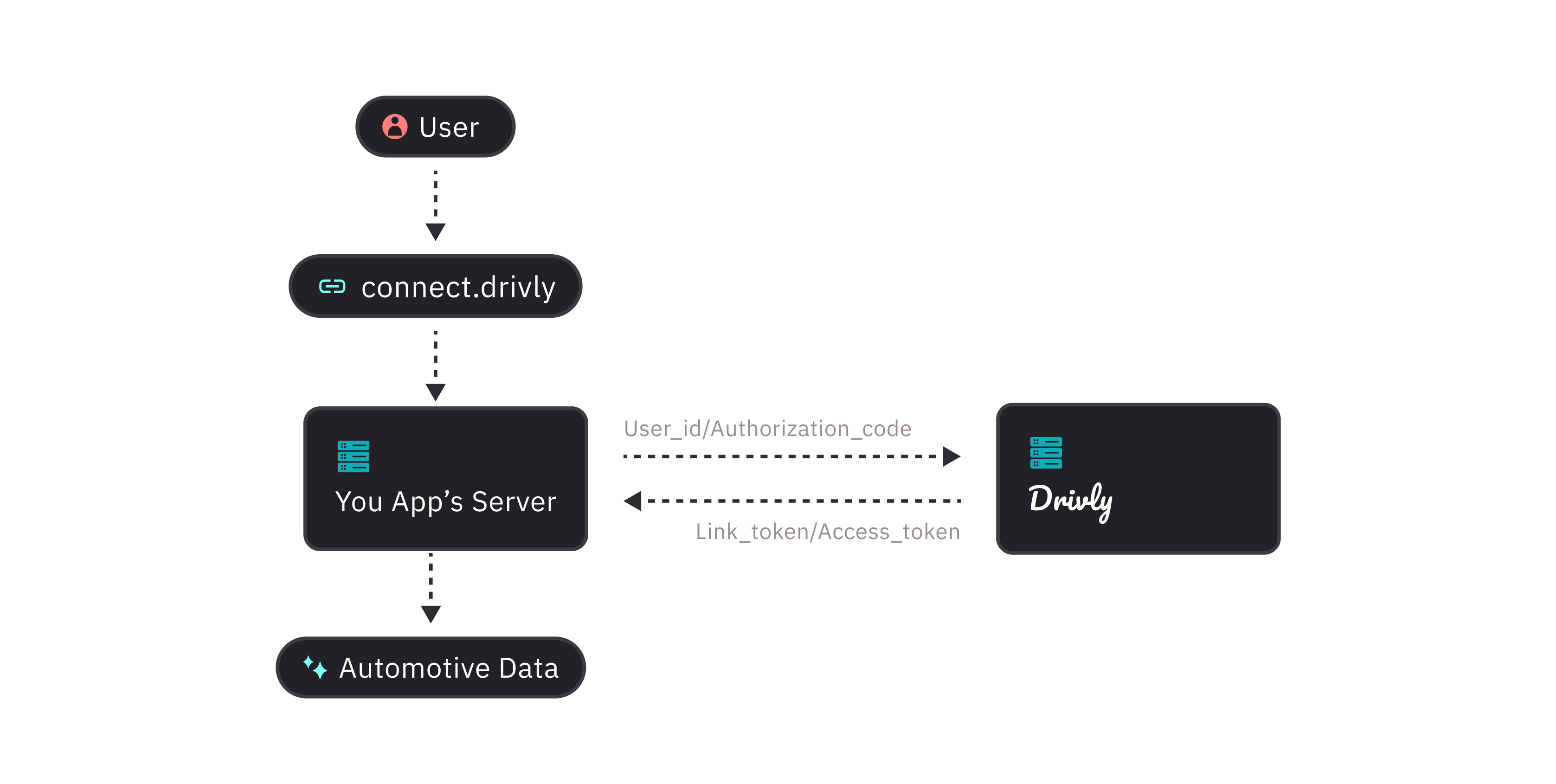
The Drivly Connect flow starts when a user wants to connect an exsisting data or service provider to their Drivly account. An overview of the process can be found below. To start integrating Drivly Connect make sure you have your `api_key` from your `dashboard`.
Before initialising the link flow, ensure you have generated a `user_id` for the specific user. This should be done when a user signs up to your service and is to be stored alongside your user entry in your database. See for more details on how to create a `user_id`.
1. To launch Drivly Connect, first generate a `link_token` by passing the `user_id` to the `/link/token` endpoint.
2. Pass the `link_token` into the Vital link component to open the link for the user. Please note: the `link_token` is a short-lived one-time use token.
3. Use the `onSuccess`, `onError`, `onExit` callbacks to handle different events on your frontend.
## Introduction to Connect
Drivly Connect allows you to link all of your automotive data and systems to Drivly and enable you to access these systems via the Drivly APIs in three easy steps:
1. Select a data or service provider
2. Sign in
3. Give consent
Drivly Connect manages credential validation, multi-factor authentication, and error handling for each integration that Drivly supports. To experience Connect, check out the [demo](www.connect.driv.ly/).
Connect is the exclusive method for connecting your automotive data and systems in both Development and Production environments and is essential for all Drivly integrations.
In the Sandbox testing environment, Connect's requirement can be optionally bypassed for testing purposes via `/sandbox/public_token/create`.
***
## Connect Flow Overview
The Drivly Connect flow starts when a user wants to connect an exsisting data or service provider to their Drivly account. An overview of the process can be found below. To start integrating Drivly Connect make sure you have your `api_key` from your `dashboard`.
Before initialising the link flow, ensure you have generated a `user_id` for the specific user. This should be done when a user signs up to your service and is to be stored alongside your user entry in your database. See for more details on how to create a `user_id`.
1. To launch Drivly Connect, first generate a `link_token` by passing the `user_id` to the `/link/token` endpoint.
2. Pass the `link_token` into the Vital link component to open the link for the user. Please note: the `link_token` is a short-lived one-time use token.
3. Use the `onSuccess`, `onError`, `onExit` callbacks to handle different events on your frontend.
 ***
## Integration & Authentication
Automotive data and service providers have different authentication flows. Some require a username and password, SSO, while others require an email address and password. Drivly supports the following provider types:
* `Google`, `Microsoft`, and `GitHub`
* `OAuth`
* `Email`
* `Email + Password`
The majority of providers are OAuth providers. These providers require a user to be redirected to a third party website to authenticate. Once authenticated, the user is redirected back to the link widget. The Email and Email + Password providers require a user to enter their email address and password into the link widget.
This is then sent to Drivly and used to connect to the provider.
View the full list of supported data and service providers [here](/connect/integrations). Don't see one you need? That's ok! You can recommend them **here**. We're actively adding providers to the Drivly ecosystem so your input is helpful.
***
## Connect Customization
You may want to add your own custom branding to your Drivly Connect flow to match your product UI. This is useful for users who have products that work directly with their customer accounts and want to use the Drivly API ecosystem.
***
## Integration & Authentication
Automotive data and service providers have different authentication flows. Some require a username and password, SSO, while others require an email address and password. Drivly supports the following provider types:
* `Google`, `Microsoft`, and `GitHub`
* `OAuth`
* `Email`
* `Email + Password`
The majority of providers are OAuth providers. These providers require a user to be redirected to a third party website to authenticate. Once authenticated, the user is redirected back to the link widget. The Email and Email + Password providers require a user to enter their email address and password into the link widget.
This is then sent to Drivly and used to connect to the provider.
View the full list of supported data and service providers [here](/connect/integrations). Don't see one you need? That's ok! You can recommend them **here**. We're actively adding providers to the Drivly ecosystem so your input is helpful.
***
## Connect Customization
You may want to add your own custom branding to your Drivly Connect flow to match your product UI. This is useful for users who have products that work directly with their customer accounts and want to use the Drivly API ecosystem.
 You can customize parts of the Connect flow, including adding your company logo, the integration select view, the button color, and enable additional features like the Account Select view straight from the Dashboard. You can preview your changes in realtime and then publish them instantly once you're ready to go live. For company logo's we accept `JPG` or `PNG` (1MB max), and for button colors we accept `HEX`, `RGB`, and `HSL` values.
For more details, see how to [Build a Custom Link](/connect/build-a-custom-link).
You can customize parts of the Connect flow, including adding your company logo, the integration select view, the button color, and enable additional features like the Account Select view straight from the Dashboard. You can preview your changes in realtime and then publish them instantly once you're ready to go live. For company logo's we accept `JPG` or `PNG` (1MB max), and for button colors we accept `HEX`, `RGB`, and `HSL` values.
For more details, see how to [Build a Custom Link](/connect/build-a-custom-link).